Learn how to qualify, apply, and choose a provider for a Free Government Smartphone with Lifeline program.
How to Get a Government Smartphone with Lifeline: Eligibility and Sign Up
Step 1: Check who qualifies for a Government Smartphone discount
To start, understand that Lifeline is a discount on service, not a guaranteed free device.
Because some companies bundle that discount with a phone promotion, many people end up with a low-cost or free smartphone.
Most applicants qualify in one of two ways: income-based eligibility or program-based eligibility.
On the income path, your household income generally must be at or below 135% of the Federal Poverty Guidelines.
On the program path, participation in certain public assistance programs can qualify you even if income paperwork is harder.
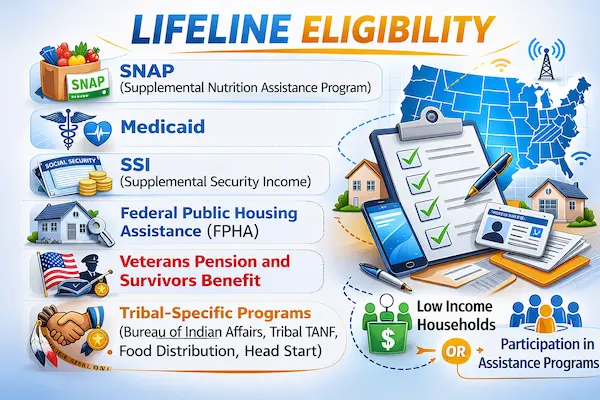
- Medicaid participation can qualify you in many states.
- SNAP benefits are commonly accepted as a qualifying program.
- SSI eligibility is often used to confirm qualification.
- Federal Public Housing Assistance may qualify your household.
- Veterans Pension or Survivors Benefit can be a qualifying pathway.
Even so, specific verification rules can vary based on your situation and state records.
When you feel unsure, the safest move is using the official Lifeline consumer site and the National Verifier flow.
Step 2: Gather the documents that speed up approval
Next, prepare your proof so you do not get stuck in a back-and-forth loop.
In many cases, the system can match your data automatically, which keeps things simple.
Whenever the match does not happen, documentation becomes the key to moving forward confidently.
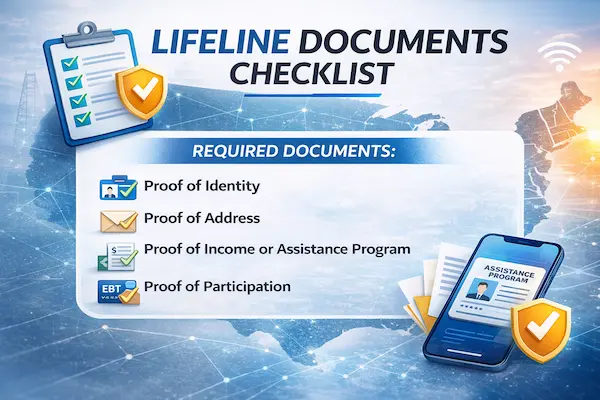
- A government-issued photo ID can help confirm your identity.
- A Social Security Number or Tribal ID may be requested for verification.
- Proof of address can be useful if your mailing address is different.
- Income proof like pay stubs or a tax return can support income-based eligibility.
- Program proof like an award letter or benefit statement can support program-based eligibility.
Before uploading anything, double-check that names and addresses match your current records.
When details differ, small fixes ahead of time can prevent a frustrating delay later.
Step 3: Apply through the National Verifier, then choose a provider
After that, you will follow a simple sequence that most successful applicants use.
- Confirm eligibility using the official Lifeline “Do I Qualify” guidance.
- Apply online through the Lifeline National Verifier or use the mail-in option.
- Wait for the eligibility decision, which may be instant or may request documents.
- Once approved, select a participating Lifeline phone company in your area.
- Complete provider sign-up so the discount is applied to your mobile plan.
- If offered, choose the Government Smartphone device option during checkout or activation.
Importantly, you can also ask your current phone company to apply Lifeline if it participates.
Once the benefit is active, your monthly cost may drop dramatically, and some plans reach $0.
At that point, a “free phone” offer depends on what the provider includes with your selected plan.
Government Smartphone Plans: What Lifeline Actually Pays For
Think of Lifeline as a monthly service credit
Instead of mailing you a phone, Lifeline generally applies a monthly discount to a phone or internet bill.
In most areas, the maximum discount is up to $9.25 per month for eligible households.
On Tribal lands, the discount can be up to $34.25 per month for eligible households.
Because many basic prepaid plans cost around that discount amount, providers can advertise “free service.”
That is exactly where the Government Smartphone marketing gets loud, and confusion often follows.
So, keep one rule front and center: the program supports service, while device offers are provider-specific.
Service options you can usually choose
With Lifeline, you can typically apply the benefit to mobile phone service or home internet service.
Depending on the provider, plans can include talk, text, and data in different amounts.
Some providers also offer bundled options, though availability changes by location.
Even when a provider labels a plan “unlimited,” slower speeds after a certain threshold can still apply.
For that reason, reading plan details before activating can save you from unpleasant surprises.
Tribal benefits can add extra value
If you live on eligible Tribal lands, the enhanced support can make higher-quality service more attainable.
In some cases, Tribal benefits can also include a one-time reduction for first-time connection charges.
Although that can be helpful, the exact way it shows up depends on the provider’s billing and setup.
Where to Find a Government Smartphone Provider Near You
Use official tools, not random ads
First, remember that social media ads are not the same as an official enrollment pathway.
Instead, use the “Companies Near Me” style search tools hosted on the official Lifeline consumer site.
By searching your ZIP code, you can see which participating companies are approved to offer Lifeline locally.
After locating options, compare plans like you would compare any phone service.
At this stage, the “free Government Smartphone” part becomes a provider promotion decision, not a federal promise.
Questions to ask before you choose a company
To protect your time, ask the right questions before you submit final enrollment with a provider.
- Ask whether the plan is truly $0 monthly after the Lifeline discount.
- Confirm whether the smartphone is free, discounted, refurbished, or requires a co-pay.
- Check how much high-speed data is included before any slowdowns.
- Verify whether hotspot is included, and how much hotspot data you receive.
- Clarify the network coverage in your neighborhood and workplace.
- Confirm shipping timelines and whether you must sign for delivery.
- Ask about replacement policies if the device arrives damaged.
Once you have those answers, your choice becomes calmer and far more informed.
Bringing your own phone can be the smarter move
Sometimes the best “Government Smartphone” is the phone you already trust.
In many cases, Lifeline providers allow BYOD, which means bringing your own compatible device.
That approach can keep your photos, apps, and settings intact while still lowering your monthly bill.
Also, number transfers are often possible, so you can keep your current phone number during the switch.
Since policies vary, confirm compatibility and porting requirements before you cancel your old plan.
Avoid Scams and Surprise Fees When Shopping for a Free Government Smartphone
Watch for common red flags
Because “free phone” headlines attract attention, scammers love to copy the look of legitimate offers.
Therefore, treat any website that pressures you with countdown timers or vague eligibility claims with skepticism.
Also, be cautious if someone insists you must pay “activation” through gift cards or crypto.
Legitimate enrollment is tied to the National Verifier and a participating provider, not a random payment link.
When in doubt, step back and use official Lifeline support channels to confirm the process.
Know what is normal, and what is not
Occasionally, a provider may charge a reasonable shipping fee or offer a paid upgrade device.
However, you should never have to pay someone just to “get you approved” for Lifeline.
Similarly, nobody should ask for your full personal details over text messages out of the blue.
Because Lifeline is a federal benefit, honesty on forms is required, and false statements can trigger penalties.
Quick myth-busting that saves time
- Myth: Lifeline guarantees everyone a brand-new smartphone.
- Fact: Lifeline is a service discount, and device offers depend on each provider’s promotion.
- Myth: Every person in a household can get their own Lifeline phone.
- Fact: The benefit is generally limited to one per household, with specific exceptions handled formally.
- Myth: Once approved, you never have to do anything again.
- Fact: You must stay eligible and recertify when asked to keep the benefit active.
Keep Your Government Smartphone Benefit Active After You Get It
Plan for annual recertification
Even after approval, Lifeline is not a “set it and forget it” benefit.
Each year, eligibility is checked, and you may be asked to confirm you still qualify.
Because missed notices can lead to losing service, keeping your mailing address and contact info updated matters.
Along the way, save important emails or letters in one folder so they do not disappear.
Use the service so it does not get turned off
If your Lifeline service is free, you generally must use it at least once every 30 days.
When non-usage happens, a notice period is typically provided so you can use the service and keep it active.
If the line stays unused for an extended period, providers can de-enroll the account under program rules.
For most people, a simple text, call, or data session each month prevents that headache.
Switching providers is possible, but do it thoughtfully
At times, coverage changes, jobs change, or your data needs grow.
In those moments, transferring your Lifeline benefit to a new participating company is usually allowed.
Still, confirm your new plan is active before you abandon the old one, especially if you rely on the line for work.
Government Smartphone Checklist: Decide If This Fits Your Life Right Now
When money is tight, the best choice is the one that reduces stress and increases stability.
For many households, Lifeline support can be the bridge that keeps them reachable for essential calls.
- Job seekers often benefit from reliable talk and text for interviews and follow-ups.
- Parents and caregivers may rely on a stable number for schools and healthcare.
- Telehealth appointments become easier when you can receive calls and verification texts.
- Students and adult learners can access online lessons when data is available.
- Anyone managing benefits can avoid missed alerts when the phone stays active.
At the same time, choose carefully if you need heavy hotspot use, since some plans limit it.
Likewise, prioritize strong local coverage over flashy ads, because signal quality is what you feel every day.
Final Notes, Transparency, and Next Best Step
Before you click any offer, anchor yourself in the truth that Lifeline is real, helpful, and rule-based.
Once eligibility is confirmed through official channels, the rest becomes choosing a reputable provider and plan.
If a free Government Smartphone is offered, treat it as a bonus that can make getting started easier.
When a free device is not offered, the service discount can still make your existing phone affordable to keep.
Notice
We do not operate, represent, or control the FCC, USAC, Lifeline providers, or any third-party companies referenced.
For the most reliable next step, use the official Lifeline consumer resources to verify eligibility and find providers in your area.