Health tracking apps: track weight, cycles, and care
Advertisements
Compare health tracking apps for weight, nutrition, cycles, cholesterol, asthma, and secure medical record access.
Health tracking apps: how to choose and set up the right one
The best health tracking apps do one thing extremely well for you.
Not ten things poorly, with notifications that make you want to delete everything.
Start by deciding what you want to track most, because that single choice will narrow your options fast.
Ask these three questions before you download
- Do I want weight and food tracking, or do I want movement and workouts first.
- Do I need cycle and fertility tracking, or do I need condition tracking like asthma symptoms.
- Do I need a medical record application, or do I just want personal insights.
When you answer these, you stop chasing “best” and start choosing “best for me.”
Step by step: a setup that actually sticks
- Pick one primary goal for the next 14 days, like steady meals, more walking, or better sleep consistency.
- Turn off every notification that is not essential, because constant pings kill motivation.
- Create simple categories you can repeat, like breakfast, lunch, dinner, snacks, and movement.
- Schedule one weekly review day, because weekly reflection is where results come from.
- Decide what “success” looks like, and keep it gentle, like “track four days this week.”
If you want a shortcut, choose one app for tracking and one place for reminders, like your calendar.
Everything else is optional until you have momentum.
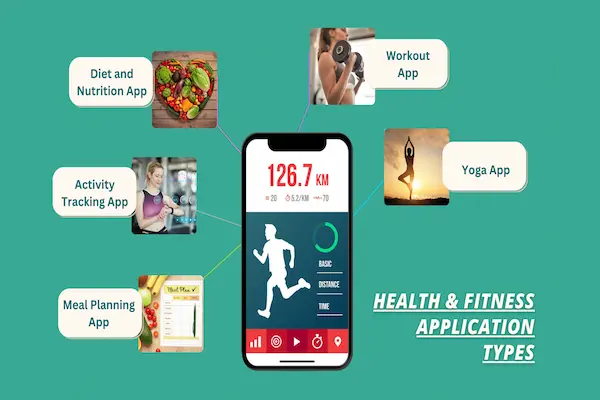
Health tracking apps for weight loss, food, and daily habits
If your main goal is weight, your tools should reduce friction, not add pressure.
That is why people search best paid weight loss apps, hoping to buy simplicity.
Paid can help, but you can often get strong results with free tools if your routine is clear.
How to evaluate the “best weight loss and calorie counter app” for you
A best weight loss and calorie counter app is not the one with the biggest database.
It is the one you can log into in under 30 seconds, even when you are tired.
- Look for fast logging, like barcode scan, favorites, and recent foods.
- Look for flexible goals, because rigid targets can backfire emotionally.
- Look for trend views, because one day does not define your progress.
- Look for realistic portions and easy edits, because perfection is not the goal.
If you use a Galaxy device, you may like a samsung health food tracker workflow because it is built into the ecosystem.
If you use it, test logging for a week and see if it feels effortless enough to keep.
Best diet and nutrition apps: what matters more than “rules”
When someone asks for best diet and nutrition apps, they usually want guidance without shame.
So prioritize apps that support awareness, not obsession.
- Choose an app that helps you build balanced meals instead of only chasing low numbers.
- Choose an app that lets you track protein, fiber, and hydration if those matter to your plan.
- Choose an app that makes it easy to plan meals, not only react to cravings.
If you want one place for everything, look for the best app to track workouts and diet together.
That combination helps you see how food and movement work as a team, instead of competing.
Best healthy habits app: build consistency without willpower battles
A best healthy habits app should feel like a friendly coach, not a strict judge.
Habits win when they are small enough to repeat on bad days.
- Use habit reminders for basics like water, steps, stretching, and bedtime.
- Track streaks lightly, because streaks motivate best when they do not feel like punishment.
- Celebrate process goals, like “prepped lunch twice,” not only outcomes.
If you are aiming for weight goals, a best weight loss goal app is one that breaks the goal into weekly actions.
Weekly actions feel doable, and doable creates confidence.
Best running app for weight loss: what to look for
If running is your lever, a best running app for weight loss should support gradual progress.
That means pacing help, recovery days, and easy-to-follow plans.
- Pick plans that scale slowly, because injuries stop progress faster than anything.
- Choose audio cues or simple intervals if you do not want to stare at your phone.
- Track weekly volume, not daily perfection, because consistency is the real metric.
If you are new to running, your best “app feature” is permission to start small.
A 20 minute walk-run counts, and it builds the habit that changes everything.
Health cycle tracking, fertility, and pregnancy support
Cycle data can be empowering when it is used for awareness and planning.
But it should never replace medical guidance, especially if symptoms feel unusual or severe.
Ovulation tracker Apple Watch: how it fits into the bigger picture
If you searched ovulation tracker apple watch, you are likely trying to connect your cycle with real patterns.
Apple Watch ovulation tracking can provide retrospective ovulation estimates on supported models when used consistently.
Retrospective means it estimates ovulation after the fact, based on patterns and logged data.
That can be useful for learning your cycle rhythms, but it is not meant to be used as birth control.
Ovia fertility app and other fertility trackers
Many people try an ovia fertility app or similar tools when they want a clear view of fertile windows.
These apps often let you log symptoms, cycles, and patterns so predictions improve over time.
If you are trying to conceive, the most helpful feature is consistent logging, not constant checking.
If you are avoiding pregnancy, do not rely on app predictions alone, and talk with a clinician about reliable contraception options.
Period tracker PCOS and “best period tracker app for PCOS” searches
People search period tracker pcos because irregular cycles can make planning hard and stressful.
A best period tracker app for PCOS is usually one that handles irregular cycles and lets you log symptoms in detail.
- Look for flexible cycle length handling, because PCOS cycles can vary.
- Look for symptom logs, like mood, acne, energy, cramps, and sleep.
- Look for exportable reports you can share with a clinician if you choose.
An app can help you track patterns, but it cannot diagnose PCOS or replace medical evaluation.
If you have concerns, bring your logs to a healthcare professional for personalized guidance.
Pregnancy meal tracker and food logging during pregnancy
Pregnancy creates a different kind of tracking need, because nutrition and safety matter more than “numbers.”
That is why people search pregnancy meal tracker and best pregnancy food tracker in the first place.
A best pregnancy food tracker should help you build consistent meals and track key nutrients if your clinician recommends it.
- Prioritize tools that support balanced meals and gentle reminders.
- Use note sections to track nausea triggers, cravings, and hydration.
- Ask your clinician what you should focus on, because needs vary by person.
If tracking ever increases anxiety, it is okay to simplify to a basic checklist and focus on calm consistency.
Cholesterol, asthma, and symptom-focused health tracking apps
Not every health goal is about weight.
Sometimes it is about managing a condition, reducing flare-ups, or staying organized for appointments.
Best cholesterol tracking app: what it should help you do
When people search best cholesterol tracking app, they usually want a clearer link between habits and lab results.
A best app for tracking cholesterol is often one that helps you track nutrition patterns, activity, and lab dates in one place.
- Use it to record lab results over time, so you can spot trends.
- Track fiber, saturated fat, and movement if those are goals your clinician supports.
- Log medications and reminders if you are prescribed cholesterol-lowering therapy.
An app can support routines, but only lab testing can confirm cholesterol levels accurately.
Always use your clinician’s guidance for targets and treatment decisions.
Asthma tracker app: when symptoms need structure
If you searched asthma tracker app, you likely want fewer surprises and better control.
A good tracker helps you log symptoms, triggers, rescue inhaler use, and peak flow readings if you use them.
- Track triggers like smoke, pollen, cold air, exercise, and illness.
- Record nighttime symptoms, because they can signal worsening control.
- Bring summaries to appointments so your clinician can adjust your plan if needed.
If symptoms worsen rapidly, do not wait for an app to validate it.
Follow your asthma action plan and seek medical care when appropriate.
Breath metabolism tracker tools: a careful reality check
You may see devices marketed as a breath metabolism tracker, promising insight into fat burn or metabolic state.
Some people enjoy the feedback loop, but claims can vary widely and may not apply equally to everyone.
If you use one, treat it as a coaching signal, not a medical measurement.
If the device encourages extreme restriction or anxiety, it is a sign to step back and simplify.
Medical record application tools and insurance apps
Tracking is easier when your information is accessible.
That is where a medical record application can become a life upgrade, especially if you manage multiple appointments.
What a medical record application can help you store
- Visit summaries, test results, and vaccination records.
- Medication lists and refill history.
- Appointments, messaging, and care instructions.
Many hospitals and clinics offer portal apps, and some people also connect records through broader health platforms.
Before you connect anything, review privacy settings and understand what you are sharing.
Florida Blue mobile app and insurer tools
Some people use an insurer app to manage coverage details, claims, and digital ID cards.
That is why you may see searches like florida blue mobile app when members want faster access to plan information.
Even if you use a different insurer, the idea is the same, which is quick access to benefits and support.
This content is independent and does not represent, manage, or control Florida Blue or any insurer platform.
Privacy, boundaries, and making health tracking apps feel healthy
Health tracking apps should support your wellbeing, not take over your mind.
If tracking makes you feel guilty, you do not need more discipline.
You need a kinder system.
Simple boundaries that protect your mental energy
- Hide calories or weight screens if they trigger anxiety, and track meals by pattern instead.
- Use weekly averages, because daily spikes are normal and not moral failures.
- Keep one day a week “light tracking” so your brain can rest.
- Remember that cycle predictions are estimates, not guarantees.
Also remember that privacy rules differ by organization, and not every app is covered by the same healthcare privacy regulations.
If privacy matters to you, read the app’s data policy carefully before connecting sensitive information.
Your 10-minute action plan to choose the right health tracking apps
You do not need to overhaul your life to get value from tracking.
You just need one smart next step.
- Pick your main goal, like food, workouts, cycle tracking, cholesterol routines, or asthma symptom control.
- Choose one app that fits that goal, and delete the rest for now.
- Set a weekly review reminder, because that is where change becomes real.
- Track for seven days, then adjust categories so the tool matches your real life.
- If you share data with a clinician, export a simple summary and focus on patterns, not perfection.
When you keep it simple, health tracking apps become a gentle guide instead of a daily stress test.
Notice: This content is independent and has no affiliation, sponsorship, or control by the entities mentioned.