Money management apps: track expenses and budget
Advertisements
Money feels lighter when you can see it clearly.
And money management apps can give you that clarity, without turning budgeting into a second job.
Money management apps: how to set up, who they help, and how to start
Most people download an app because they want one thing.
They want to manage my expenses without feeling confused every time the card gets swiped.
If that is you, you are exactly who these tools are built for.
Money management apps help individuals, couples, and small business owners see spending patterns, plan bills, and reduce financial stress.
The “right” app depends on your life, not on a trending list.
Step by step: set up an app to track expenses in 15 minutes
- Pick one goal for the next 30 days, like “track my expenses daily” or “stop overdrafts.”
- Choose your style, which is manual entry, bank sync, or an expense tracker web app you use on desktop.
- Create 8 to 12 categories you actually use, like rent, groceries, gas, subscriptions, and eating out.
- Add fixed bills with due dates, so you can see what is already committed before you spend.
- Turn on only essential notifications, like bill reminders, and turn off the rest.
- Log every purchase for seven days, even if you do not like what you see.
- Schedule a 10 minute weekly review, because that is where budgets become real.
If you want the simplest start, choose an app that tracks your expenses and does not require a long setup.
If you want more control, choose a program to keep track of expenses that supports custom categories and exports.
Either way, the best budget management starts with consistency, not perfection.
Who benefits most from expense tracking
- If you feel like money disappears, you need visibility first.
- If you are paying off debt, you need control and a plan.
- If you share bills, you need a shared system and shared expectations.
- If you run a side hustle, you need clean separation between business and personal spending.
Once you know which group you are in, picking a tool gets easier.
Best budget management features that actually change your life
Many apps look impressive in screenshots.
But the features that matter are the ones you will use when you are tired and busy.
Think of this as your filter for top expense tracking apps, without getting lost in hype.
Must-have features for most people
- A fast way to log or import transactions so tracking does not feel heavy.
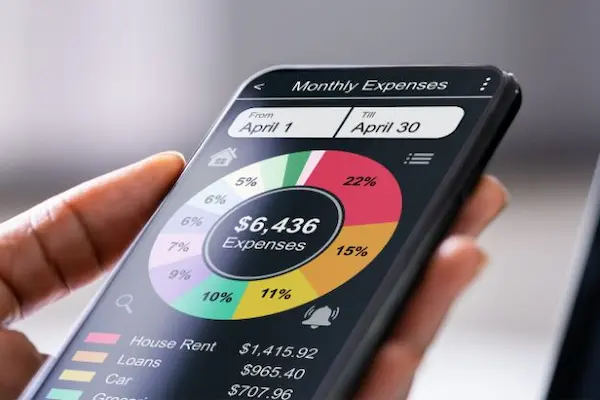
- A clear monthly view so you know what is left, not only what is spent.
- Category rules so recurring purchases sort themselves over time.
- Bill reminders so you stop paying late fees and stress taxes.
- Export options so you are not trapped if you change tools later.
If you are hunting for the best program to keep track of expenses, exports and clarity matter more than fancy charts.
If you are hunting for the best personal budget tracker, the weekly review flow matters more than the brand name.
Nice-to-have features when your system is stable
- Shared budgets for households, with roles and permissions.
- Receipt capture for reimbursements and tax organization.
- Goal buckets for sinking funds like travel, gifts, or car repairs.
- Simple trends that show your progress without making you feel judged.
These features are helpful, but only after you build the habit.
Expense tracker web app vs mobile apps: which is better for you
Some people budget best on a phone.
Other people need a bigger screen and a calmer environment.
That is where an expense tracker web app becomes the better fit.
You may also see the term expense manager web app when people want desktop-style controls and easy exporting.
Choose mobile-first if this sounds like you
- You want to log spending immediately after a purchase.
- You forget details later, so real-time capture matters.
- You want quick alerts for categories that are getting too high.
Choose web-first if this sounds like you
- You review money once or twice a week and prefer deep cleanup sessions.
- You like spreadsheets, exports, and more detailed reports.
- You manage shared household finances on a laptop together.
If you want both, choose a tool that includes mobile plus web access.
That combination is often the best online budget tool experience for busy households.
Money management apps for individuals: how to choose the best fit
If you are budgeting solo, simplicity is your superpower.
You want the best expense tracking app for individuals that makes “track my expenses” feel almost automatic.
You also want the best app to track personal spending in a way that does not trigger shame.
What to look for in the best app for personal budgeting and expense tracking
- It takes less than 30 seconds to add a transaction.
- It shows you weekly and monthly totals clearly.
- It supports categories that match your real life, not a generic template.
- It makes corrections easy when it mislabels a purchase.
If you keep quitting apps, the problem is usually friction, not motivation.
Choose the simplest app to organize expenses, then add complexity later if you truly need it.
Money management apps for couples: shared budgets without fights
Most couples do not argue about math.
They argue about surprises and unspoken expectations.
That is why the best app for budgeting couples is the one that reduces surprises first.
Step by step: a couples system that stays calm
- Agree on one shared goal, like “pay off a card” or “build a buffer.”
- Define what is shared spending and what is personal spending.
- Give each person a small personal category with no questions asked.
- Choose one place to track shared bills, like rent, groceries, and utilities.
- Schedule a 15 minute weekly check-in with the app open.
If you want shared visibility, pick a tool designed for shared budgets and shared categories.
If shared access feels stressful, keep one shared sheet for bills and use separate personal trackers for everything else.
Best home expenses app approach: bills, subscriptions, and real life
Households have “invisible” costs that can quietly destroy a budget.
Subscriptions, school expenses, medical copays, and home repairs add up fast.
That is why people search best home expenses app when they want to stop missing small leaks.
Home categories that prevent surprise months
- Home maintenance and repairs.
- Subscriptions and recurring services.
- Kids and school costs.
- Health and pharmacy spending.
- Gifts and seasonal expenses.
If you create these categories, your budget stops being reactive.
Your budget becomes a plan that anticipates reality.
Small business money management app basics: keep it clean and separate
Business money feels chaotic when it mixes with personal money.
A small business money management app should make separation easy, not complicated.
Even if you are a freelancer, clean tracking protects you at tax time and during slow months.
Step by step: a simple business expense system
- Use a separate business account if possible, even if your business is small.
- Choose an app to track expenses with tags for business versus personal.
- Capture receipts for deductible purchases when relevant.
- Review income and expenses weekly so cash flow does not surprise you.
- Set aside a tax buffer if you are responsible for self-employment taxes.
If you need desktop workflows, an expense tracker web app can make business exporting easier.
If you handle many receipts, prioritize capture speed over fancy dashboards.
Best app to manage debt: turn payments into a clear plan
If debt is the main stressor, tracking alone will not feel satisfying.
You also need a payoff strategy you can follow.
That is why many people search best app to manage debt after they already tried basic budgeting.
Two payoff strategies that many people use
- The snowball method focuses on paying smallest balances first for quick wins.
- The avalanche method focuses on paying highest interest first to reduce total cost over time.
A good debt workflow shows your balances, minimums, due dates, and one extra payment target.
It should also remind you that progress is built monthly, not daily.
Debt tracking habits that protect your momentum
- Automate minimum payments so you stop missing due dates.
- Choose one day per month to apply extra payments intentionally.
- Track your interest charges so you understand what the debt is costing you.
If you do these three things, you will feel more in control even before the balance is gone.
How to manage my finance with a simple weekly system
Apps are tools.
Systems are what make tools work.
If you want to manage my finance without burnout, you need a weekly rhythm that is easy to repeat.
The 10 minute weekly review
- Open your app and scan the last seven days of transactions.
- Fix categories quickly so your numbers stay trustworthy.
- Check three categories that usually drift, like food, shopping, and subscriptions.
- Look at upcoming bills and decide what needs to be protected.
- Pick one small improvement for next week, not five.
This routine turns “an app to track expenses” into a real money plan.
And it keeps your budget from becoming a guilt trap.
Desktop options and “expense iq for pc” style searches
Some people prefer desktop tools because they feel calmer and more detailed.
That is why you may see searches like expense iq for pc when looking for a computer-based tracker.
If you are considering desktop software, focus on usability, exporting, and data ownership.
What to check before choosing a desktop expense tool
- Can you export your data to common formats.
- Can you back up your data easily.
- Does it support budgeting categories that match your needs.
- Does it make monthly review and reporting simple.
Desktop tools can be powerful, but only if you actually use them consistently.
Privacy and safety: use money management apps without regret
Your money data is sensitive.
So your app should treat your trust with respect.
If an app pushes aggressive upsells or feels unclear about data use, it is okay to choose something else.
Simple safety habits
- Use a unique password and enable two-factor authentication when available.
- Review connected accounts periodically and disconnect anything you no longer use.
- Do not click random links claiming they can “fix” your account instantly.
- Download exports occasionally so you always control your history.
Security is not about fear.
Security is about staying in control.
Final action plan: choose one tool and win in seven days
Decision fatigue is real, so your plan should be simple.
Your goal is not to find the perfect app.
Your goal is to build a habit that makes money feel clear.
Your seven day plan
- Pick one tool and commit for seven days.
- Track every expense for one week and do not judge yourself.
- At day seven, review totals and choose one category to improve.
- Set one rule for next week, like “pause impulse buys for 48 hours.”
- Repeat the weekly review and watch how quickly clarity grows.
If you do this, you will naturally discover what your best budget management style is.
And you will be able to choose the best personal budget tracker for you with confidence.
Notice: This content is independent and has no affiliation, sponsorship, or control by the entities mentioned.