How to Get Your Free Government Phone
Advertisements
Discover how to qualify and apply for a free government phone in 2026.
Free New Government Smartphone with Lifeline Program
Discover how to qualify, eligibility, documents, providers, and application.
HOW TO APPLYYou will remain on the same website
How to Apply for a free government phone with Lifeline in 2026
Start by understanding what Lifeline actually provides
Rather than handing you a phone directly, Lifeline is a federal monthly discount that makes phone or internet service more affordable.
Because providers compete for customers, many of them bundle that discount with a basic smartphone promotion.
For that reason, the “free government phone” you see in ads is usually a provider offer powered by Lifeline support.
Even so, a brand-new model is not guaranteed, since some offers use entry-level or refurbished devices depending on availability.
Know why Lifeline matters more now than it did a few years ago
In the past, many households combined Lifeline with the Affordable Connectivity Program for larger savings.
Since ACP ended in 2024 due to a lack of additional funding, Lifeline became the main federal option for ongoing monthly discounts.
With that in mind, focusing your effort on a clean Lifeline application is the fastest route to a real outcome.
Check eligibility for a free government phone before you apply
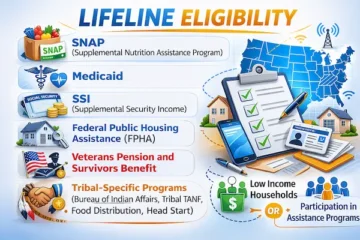
Most applicants qualify through income, or through participation in a qualifying assistance program.
On the income route, eligibility is based on household income at or below 135% of the Federal Poverty Guidelines.
On the program route, a member of your household already receiving specific benefits can qualify the entire household.
- SNAP, often called Food Stamps, is a common qualifying program.
- Medicaid eligibility is frequently used to confirm Lifeline qualification.
- SSI can qualify many households without needing income documents.
- Federal Public Housing Assistance, including Section 8, may qualify you.
- Veterans Pension or Survivors Benefit can also be an eligibility pathway.
Importantly, only one Lifeline benefit is allowed per household, not per person.
When multiple adults live together, the official “household” definition focuses on whether you share income and expenses.
Collect the documents that help you get approved faster
Before submitting anything, gather proof that matches the name and address you will put on the application.
In many cases, the National Verifier can confirm eligibility automatically through database matching.
When that automatic match fails, documents become the deciding factor for manual review.
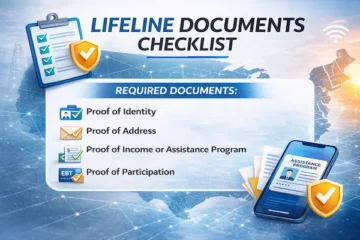
- Proof of identity is commonly required if the system cannot validate you automatically.
- Proof of address can be necessary if records do not match your current residence.
- Proof of income may be requested if you qualify through the 135% income rule.
- Proof of program participation may be needed if you qualify through SNAP, Medicaid, or similar programs.
- The application typically asks for the last four digits of your Social Security Number or a Tribal ID number if you do not have an SSN.
When pay stubs are used, covering a full three months in a row can be important for income verification.
After scanning documents, save clear copies so you can re-upload quickly if the system requests them again.
Follow the step-by-step process that most successful applicants use
First, apply through the National Verifier, which is the centralized eligibility system managed by USAC.
Next, choose a participating phone company in your area and complete the provider signup to activate service.
Finally, select your device option if the provider offers a free phone promotion during enrollment.
- Go to the official Lifeline website and select “Apply.”
- Create your application and enter your legal name, date of birth, and address carefully.
- Submit your eligibility path, either income-based or program-based, using accurate household information.
- Upload documents if requested, making sure each file is readable and unexpired when required.
- Wait for approval, or respond quickly if the application shows an error that needs extra proof.
- Use the official “Companies Near Me” tool to find Lifeline providers that serve your ZIP code.
- Enroll with the provider you choose, and confirm your plan details before accepting a phone offer.
At that point, your Lifeline benefit is tied to the provider account, so device shipping and activation rules come from that company.
Because availability changes by state and network, relying on official tools is safer than trusting random ads.
Free government phone offers: what “free” and “new” really mean
Expect a service discount first, and a device offer second
Most “free government phone” promotions exist because the provider can afford to include a device while using the Lifeline discount on service.
Sometimes the phone is truly free, while other times the offer is a low-cost upgrade with a small one-time payment.
In practice, the smartest move is comparing the plan quality, since the device is only useful if coverage is reliable.
Understand why “new phone” is not guaranteed
Some providers ship brand-new entry-level smartphones, while others ship refurbished devices that meet basic standards.
Because inventory changes, the exact model can vary even inside the same company over time.
For that reason, treat “new” as a marketing phrase unless the provider confirms the device condition in writing.
Consider bringing your own phone if you want more control
Many Lifeline providers allow BYOD, meaning you can bring a compatible unlocked phone and still receive the Lifeline discount.
That option often makes sense if you already have a phone you trust and want to keep your apps and photos intact.
Before switching, confirm compatibility and make sure number transfer rules fit your needs.
How to choose the best provider for your free government phone
Use official provider listings, then compare like a savvy shopper
Instead of guessing, search your city or ZIP code using the official “Companies Near Me” lookup.
After you have a shortlist, compare plans on coverage, data amount, hotspot availability, and customer support access.
Because Lifeline is national but providers are local, the best choice depends on where you live and work.
Ask these questions before you accept a free government phone
- Which network does the service use in my area, and how strong is coverage indoors.
- How much high-speed data is included, and what happens after the limit is reached.
- Is hotspot included, and if so, how much hotspot data is available each month.
- Is the smartphone new or refurbished, and what model options are currently in stock.
- Are there any shipping charges, upgrade fees, or optional add-ons that cost extra.
- How do replacements work if the phone arrives damaged or stops working soon after activation.
If answers are vague or constantly changing, choosing another provider can save you weeks of frustration.
Recognize common provider names, while still verifying availability
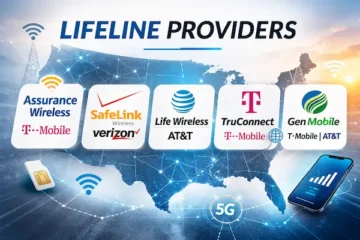
In many states, popular Lifeline brands may include Assurance Wireless, SafeLink, TruConnect, or StandUp Wireless.
Even so, availability and phone offers vary by location, so confirming service in your state is essential.
When a company is not listed for your ZIP code in official tools, skipping it is the safest decision.
Rules you must follow to keep your free government phone active
Use the service at least once every 30 days
If your Lifeline service is free, usage rules require activity at least once every 30 days to keep the line active.
When no use occurs for 30 days, providers generally send a notice giving you 15 days to use the service.
If the account stays inactive after that notice period, the provider may turn off service under Lifeline rules.
To avoid surprises, sending one text, placing one call, or using a small amount of data monthly can help.
Take annual recertification seriously
Each year, USAC checks whether you still qualify, which is called recertification.
If you are asked to recertify, responding within the required timeframe is critical to keep the benefit.
When that request is ignored, the Lifeline benefit can be removed, and service may end.
Remember the one-per-household rule
Lifeline is limited to one benefit per household, so multiple enrollments at the same address can trigger problems.
When roommates live together but do not share money, they may be separate households under the program definition.
In those cases, completing the household worksheet correctly helps prevent accidental denials.
Free government phone tips for immigrants, newcomers, and mixed-status households
Eligibility depends on verifiable criteria, not nationality alone
Lifeline qualification is based on income or qualifying programs, and the application must be verified through official systems.
Because the form typically asks for SSN last four digits, lacking an SSN can make the process harder for many newcomers.
If you do not have an SSN, the federal Lifeline application generally points to a Tribal ID alternative rather than an ITIN.
Avoid risky assumptions, especially about tourists and short-term visitors
Tourists and short-term visitors usually cannot meet the verification requirements tied to U.S. benefit programs.
For that reason, anyone applying should be prepared to prove eligibility cleanly through the National Verifier process.
Check state-specific programs if you live in a state with extra rules
Some states run their own Lifeline-style programs alongside the federal benefit, with different procedures and documentation rules.
California, for example, has a state LifeLine program with its own eligibility limits and provider enrollment steps.
Because state rules can change and may require specific identification, using the official state website prevents misinformation.
How to avoid scams while searching for a free government phone
Spot the red flags before sharing personal information
Any site that demands gift cards, crypto, or “instant approval fees” should be treated as a scam risk.
Likewise, a legitimate application will not require you to hand over sensitive details through random text messages.
Since eligibility is determined through official systems, always start with the National Verifier and Lifeline support resources.
Protect your benefit by staying honest and organized
Lifeline rules require truthful information, and false statements can create serious consequences.
To stay safe, keep your application ID, copies of documents, and provider account information in one secure place.
If something looks wrong, contacting the Lifeline Support Center is a safer step than guessing.
Verizon free phone with new line
If your goal is to switch to verizon and get a free phone, the biggest win comes from understanding how Verizon structures promotions.
In many cases, a free phone when you switch to verizon is “free” because monthly bill credits offset a device payment agreement over time.
That’s why a verizon wireless free phone deal can look incredible on day one, yet still require you to keep the line active until the credits finish.
How a “free phone” with a new line usually works
Most offers are tied to a verizon free phone with new line requirement, meaning you add service first and get credits second.
Because the promotion is attached to a new number, you’ll often see the same idea phrased as verizon new line free phone or free phone with new line verizon.
Similarly, some campaigns spell it out as verizon add a line get a free phone, which is essentially the same mechanic with slightly different wording.
For people joining Verizon for the first time, these deals are often marketed as verizon free phones for new customers, even though plan eligibility still matters.
Step-by-step: qualify cleanly and avoid surprises
- Start by opening the promo details so the verizon free phone offer rules are clear for the exact model you want.
- Next, confirm whether it’s for switching, adding a line, or both, since “switch service get free phone” and “add a line” promos can differ.
- After that, choose from the eligible tiers, because verizon free phone plans are often limited to specific unlimited plans.
- Then select installment billing, since many “free” deals require device payments that the credits will offset.
- Once the line is active, monitor the next one or two bills so credits show up as expected under the verizon free phone promotion.
- Finally, keep the same line and qualifying plan active through the full promo period so the credits continue.
Common promo variations you may see
Across ads and comparison sites, you’ll notice phrases like free phone verizon deals or verizon wireless free phones used as umbrella terms.
Sometimes the headline promises a verizon free i phone, which may require a specific plan tier, trade-in, or both, depending on the promotion.
In other seasons, you might spot a buy one get one free mobile angle, which typically depends on adding multiple lines and meeting strict conditions.
Another modern twist involves simless phones, meaning devices that rely on eSIM, so activation steps can look different than older SIM-card setups.
What can stop credits and make the phone not “free” anymore
Plan downgrades can interrupt credits, which is why staying within eligible plan rules matters for the full term.
Line cancellations can also end the discount early, leaving a remaining device balance that becomes your responsibility.
Early payoff can sound smart, yet some promotions rely on monthly credits that only apply while the device payment agreement remains active.
Prepaid comparisons and realistic expectations
While Verizon promotions are usually postpaid, researching mobile phone plans prepaid can still be useful if you prefer flexibility over long-term credits.
Likewise, monthly prepaid phone plans can be easier to cancel, although they rarely include the same “free device via bill credits” structure.
On the other hand, “free monthly phone service” typically refers to government-supported programs like Lifeline with participating providers, not standard Verizon postpaid promotions.
We do not operate, represent, endorse, or control Verizon or any third-party companies referenced in this section.